

Social networks have always been an invaluable source of information for any analysis you need to perform. However, there's often so much information that it's difficult to collect, catalog, and "normalize" it. Therefore, using the right tool during the data collection phase can make the difference between a well-executed analysis and a catastrophe.
One of the most widely used social networks is undoubtedly Facebook. There are many freeware and/or open source tools that allow you to collect and analyze data. One of the most powerful, for use in a Windows environment, is undoubtedly ExtractFace, a tool that's still experimental but has incredible potential. Once installed and configured, it will allow you to automatically collect various types of information from Facebook profiles and organize them into different formats. However, since it's still an experimental product, you may often encounter some malfunctions, depending on your work environments and software and Facebook updates.
First steps
For the tool to work, it requires the Google Chrome browser to be running in "debug mode." This mode records information about browser activity by transmitting it to a specific network port, which our tool will read to collect data. To run the browser in this mode, simply create a shortcut to the executable file and add the option --remote-debugging-port=9222. To do this, right-click on the browser shortcut (usually found on the desktop) and edit the "Target" field by adding the string just indicated immediately after the quotation marks.
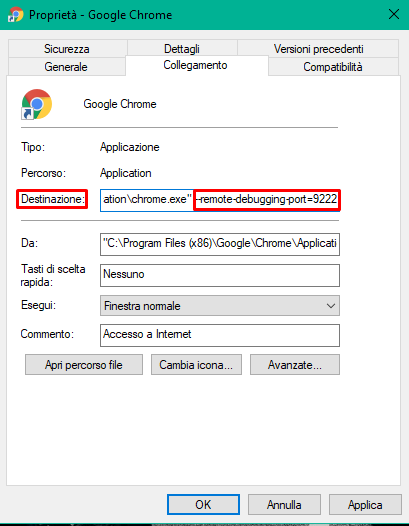
I recommend creating two separate browser shortcuts, one to use normally and one to launch in debug mode.
The features
Once Chrome is configured and the setup file is installed, duly downloaded from the site le-tools.com, We're ready to begin. When you launch ExtractFace, you'll find the tool icon at the bottom right, among other icons. Right-clicking it will reveal the available functions.
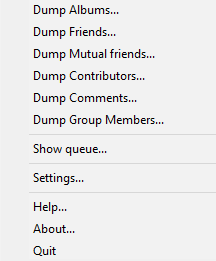
At this point, all we need to do is launch the appropriately configured Chrome browser and visit the Facebook profile whose data we want to collect. Obviously, we need to log in to Facebook to view as much information as possible without interacting directly with our target. It can be helpful to have one or more "investigative profiles" to avoid exposing your personal account.
You should keep in mind, however, that this tool, like any similar solution, can't work magic; it can only collect data that accounts share (more or less knowingly). The more privacy-conscious the user of the target profile is, the less effective the tool will be. It's important to always keep in mind that we're talking about a data collection solution, not a solution for extracting private information or violating anyone's privacy.
How is it used?
Let's start by briefly looking at what each individual function allows us to do.
With “Dump Albums”"We can download the various public photo albums of the target profile locally. Let's connect to Facebook, visit the "Photos" page of the profile we're interested in, and launch the "Dump Albums" function.
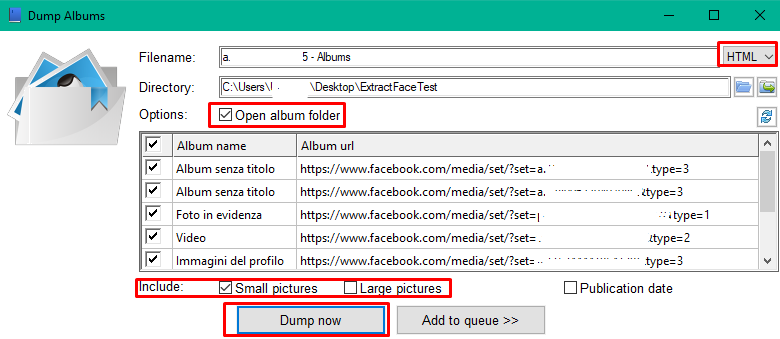
The tool automatically recognizes the Facebook profile we're visiting and includes it in the file name it generates. At this point, we need to choose the file format that will be generated—HTML, XLSX, or TXT—based on our needs, and click "Dump now.".
We can choose whether to download the images in a reduced format or not, whether to include the image publication date in the report, and whether to open the folder at the end of the process. We can also decide to add the dump execution to an instruction queue, in case we want to leave the software to run a large number of instructions.
With the “ function“Dump Friends” we can download the target profile’s friends list, obviously provided that the list is public.
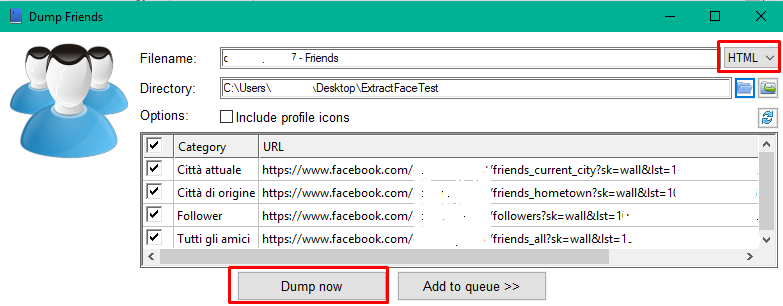
We can choose whether to include profile icons in the resulting file. This will obviously slow down the process.
The function “Dump Mutual friends”" is practically identical to the previous one, but it only downloads mutual friends between the target profile and the profile we're examining. The use cases are more limited, and being friends with our targets isn't always a great idea.
“Dump Contributors”" is one of the most powerful and interesting features. It collects all the profiles that have interacted with the Facebook page we are visiting. It is particularly useful for collecting the profiles that have interacted with our target if they have configured their privacy settings to not display their friend list.
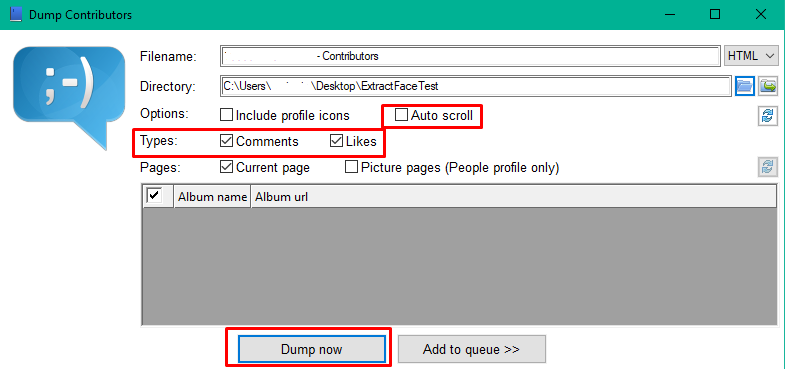
Here too, we can choose the output format. Additionally, with the "Auto scroll" option, we can ask the tool to automatically scroll the page we're viewing or download only the information present in the portion of the page loaded in the browser. We can also decide whether to collect data from profiles who have liked posts on the page, those who have commented on them, or both.
With the “ function“Dump Comments”, in addition to collecting data from profiles that have left one or more comments, we can also obtain a report containing the content of the comments.
Finally, the function “Dump Group Members”" allows you to collect the profiles of users who are part of a group. It works similarly to the "Dump Friends" function.
In conclusion
The tool therefore allows for the collection and cataloging of a large amount of data in a "normalized" format. Its applications are diverse, both for optimizing and formatting reports and for exploiting information and optimizing analysis processes. To learn more, please consult the official documentation.
In a future article, we will discuss some uses and applications of the ExtractFace tool in combination with other tools.
Leave a Reply