

Premise
The era of the so-called home cinema marked the explosion of a market dedicated to the creation of both hardware and software solutions, starting from simple audio/video playback components up to software designed to catalogue entire bookstores multimedia, giving us a truly respectable audiovisual experience, sitting comfortably on our sofa.
The spread of so-called devices smart and the advent (finally!) of broadband Internet connections have shifted the attention of us digital curious people towards the possibilities of all-round interconnection, giving rise to media center.
From the ashes of XBMC, one of the first applications dedicated to living room entertainment, today reborn with the name of Kodi, the project was born Plex, a multimedia player that features client/server components.
One of the great advantages of this type of software lies in the possibility of installing the component with the features of server on a device located within a local network, such as a PC, a console, a NAS or even a router. The part server will be responsible for hosting the media library and transcoding the media content, which can then be streamed to the player, installable on any fixed or mobile device, including smartphones.
Of course, the Plex server can also be reached from outside the local network, as the software allows access to your media library via authentication.
And this is where the first problems begin: I don't think anyone wants to give free access to their collection of arthouse films or, worse, to the latest beach holiday videos or even their favorite manga series!!!
Some widely used interfaces have been created for managing your media collection which, if poorly configured, leave dangerous loopholes for your privacy.
One of these interfaces is called Tautulli, the description of which is clearly reported on the relevant project github:
“… a python based web application for monitoring, analytics and notifications for Plex Media Server“. …
The standard configuration, unfortunately, as often happens if not well personalized, brings with it some bugs that can be very annoying.
Let's go and see them together.
“Search and Rescue”
First of all we connect to the site Shodan.io. By entering the following string in the search field “CherryPy/5.1.0 /home” (CherryPy, a useful framework for creating web applications in Python, is used by Tautulli as a web server) we will get an unexpectedly long list of indexed devices:
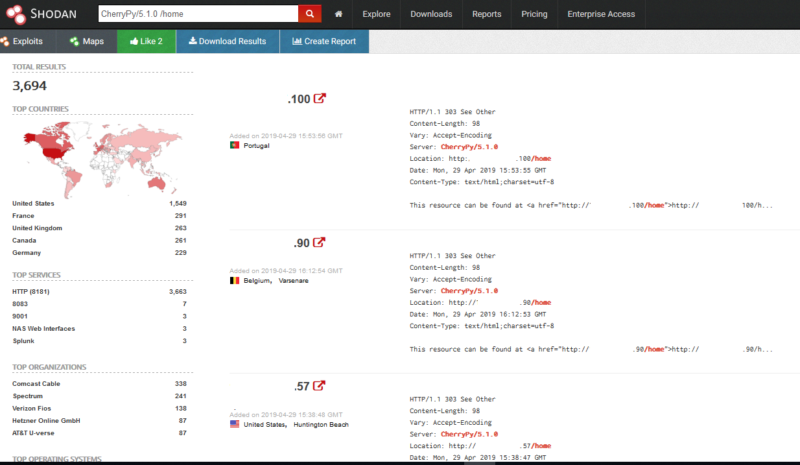
If we wanted to limit the search "only" to Italian occurrences, adding country: "IT"” For the previous query, we would get, at the time of writing, 24 results. Not bad (so to speak)!
By selecting any of the devices shown in the previous Shodan screen, we have the possibility to catapult us within the corresponding Tautulli interface.
For obvious reasons, for this test, I preferred to install Tautulli on a virtual machine after installing and configuring the Plex server on a small media library on my (fantastic :-P) Nintendo Shield.
This is the home page displayed when the “Tautulli.py” file is started:
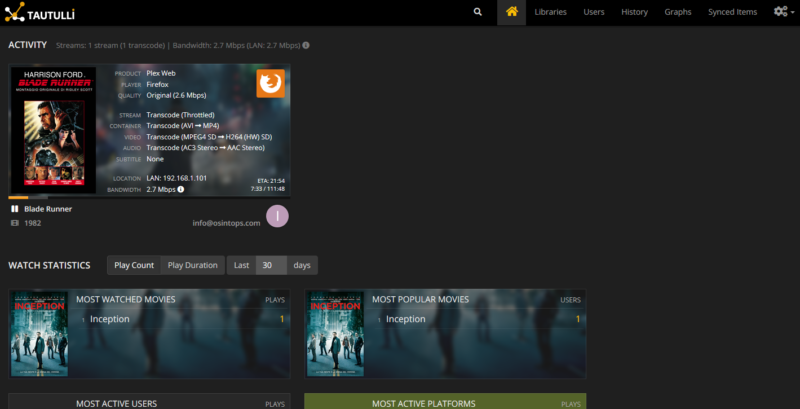
I would like to point out that if we were exploring the interface of a PC placed on the other side of the world, we would have access, in addition to the entire collection of films and series present in the Plex server with statistics on viewings (and therefore full access to user preferences), also to highly sensitive data, such as the email addresses and user registration names who have access to the media library, the devices used to view the videos and the latest IP address from which they logged in!
All this without any authentication required.
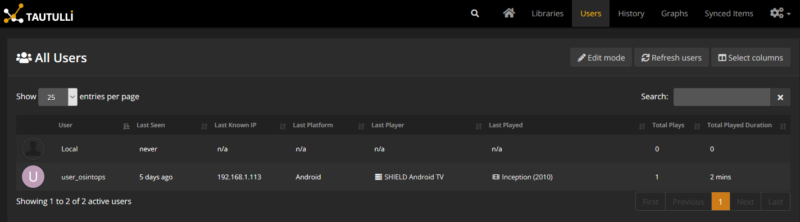
If all this seems bad enough, sit back: there's worse!
Normally, after browsing through all sorts of data (I repeat: only do this on your own devices, as a case study!), if we wanted to watch a movie it wouldn't be possible, because the moment we selected a title we would get the Plex page that invites us to authenticate.
Unfortunately, there is no good news in this case either.
Due to an unresolved bug reported in this white paper, you can view (or download) any content from the libraries identified in the ways just indicated.
In short, through the Tautulli settings screen, you can view the number of token used for the Plex account, as highlighted in the following image:
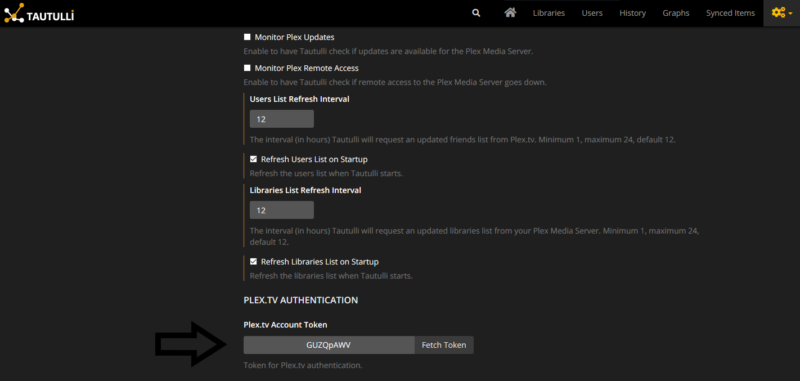
Once you have the token, you need to follow some fairly simple steps.
Without wanting to go into too much detail, as they are beyond the scope of this article and in any case they are explained quite well in the paper Of @GerardFuguet, simply go to the URL on which the Plex server is listening to interface with Tautulli, usually on port 32400 and add the value of the token retrieved previously.
Therefore we will have a typical address:
http://indirizzoIP:32400/?X-Plex-Token=xyz
where, instead of “IPaddress” there will be the real IP address of the device on which the Plex server was installed and instead of “xyz” we will insert the value of the token.
In response, you will get a page in XML format like this:
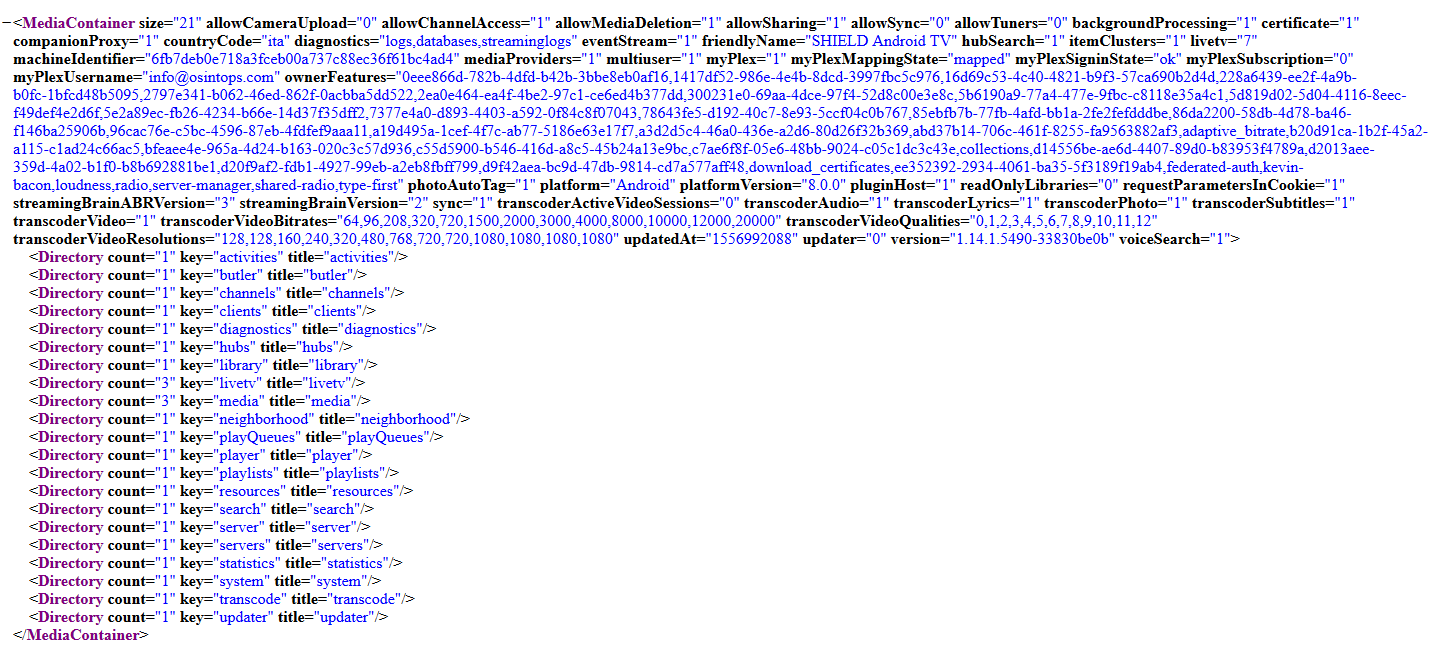
In a further 3 or 4 steps, by retrieving the correct information from the XML files that will be displayed from time to time, we will be able to view our favorite movie on the screen, or even download it, so as to arrive at the following result (in my case 😉 ):

Conclusions
We have seen how the incorrect configuration of a service created for recreational purposes has exposed online not only an infinite amount of multimedia content (often in violation of copyright laws, among other things) but has also made easily accessible a lot of personal data of users, such as emails used, usernames, viewing statistics, devices used and related IP addresses, as well as private videos and photos in case they have been uploaded to the Plex server, with rather obvious and heavy privacy implications.
Leave a Reply