

I'm "young" in the OSINT world and everything fascinates and intrigues me...
While surfing the web, I landed, late at night, on the page of Digital Methods Initiative: a Dutch research group that collaborates with numerous European and non-European universities and organizations with important names
On their website there are two particularly interesting sections: the part dedicated to the numerous academic publications and the one reserved for the "“Tools”" for the analysis of metadata, social networks and various other diabolical gadgets that I won't list both so as not to make you lose the pleasure of exploration and because, in my opinion, it's worth spending a bit of time on...
Among the tools present I want to tell you about "“TCAT” intended for the acquisition and analysis of data from Twitter.
Introduction
TCAT from the Digital Methods Initiative (DMI), as already mentioned, allows to acquire and analyze significant amounts of data obtained from Twitter via API, unlike what it does Twint which collects data by scraping the web part of the site.
Operation
The tool operates in two distinct phases:
- CAPTURE: requests can be refined through search queries by keyword, hashtag, geographic coordinates or by user;
- ANALYSIS: The results can be analyzed in various ways and further filtered, mainly by outputting files in standard CSV and GEXF formats for direct import to Gephi.
DMI has released the source code of this software on GitHub to make it installable on Ubuntu 16 or 14.
Contrary to what the authors themselves prescribed, I tried to install the tools on Ubuntu 18 and it did not work.
I then installed TCAT on an Ubuntu 16.0.4 virtual machine using VirtualBox, following these steps:
# on the newly created machine there will be no curl so we will install it with this command: <br>$ sudo apt-get install curl<br><br># immediately after we can download the file "tcat-install-linux.sh" from the repo" <br>$ curl -O "https://raw.githubusercontent.com/digitalmethodsinitiative/dmi-tcat/master/helpers/tcat-install-linux.sh""<br><br># ...and make it executable <br>$ chmod a+x tcat-install-linux.sh<br> <br>#he installation is now ready to start<br>$ sudo ./tcat-install-linux.sh <br>
During installation, you will first be asked for the Twitter API and then for other configuration parameters.
For clarity, I'm reporting the summary screenshot of the TCAT configuration performed on my VM:
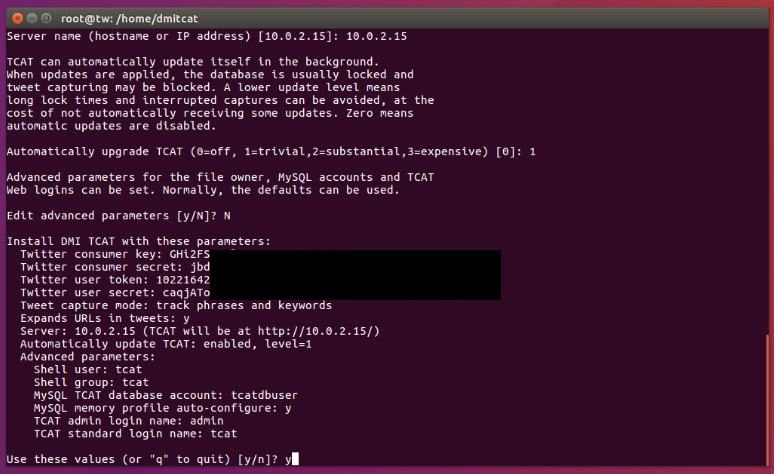
At this stage you will also be asked what type of "capture mode" to perform once TCAT has been installed, i.e. the type of data acquisition, which can take place in 2 ways:
- via phrase and/or keyword or by geolocating an area;
- via the user.
For convenience, I have set up two virtual machines with the two “capture modes” indicated above that I use with different APIs.
Once the installation script is finished, the terminal will summarize the access parameters:
Done: TCAT installed<br>Please visit this TCAT installation at these URLs:<br>http://10.0.2.15/capture/ <br>http://10.0.2.15/analysis/<br>TCAT administrator login (for capture setup and analysis):<br>Username: admin <br>Password: qUQQrQ---------------------------------<br>TCAT standard login (for analysis only):<br>Username: tcat <br>Password: fE882----------------------------------<br>IMPORTANT: please save the above generated TCAT Web login passwords.<br>MySQL accounts have been saved to /etc/mysql/conf.d/tcat-*.cnf.<br>The following steps are recommended, but not mandatory
I highly recommend saving your login passwords!
From now on the fun begins 😉
To run TCAT you will need to type the link above into the search bar of a browser http://10.0.2.15/capture/ and enter the username and password provided, once this is done the dashboard will open:
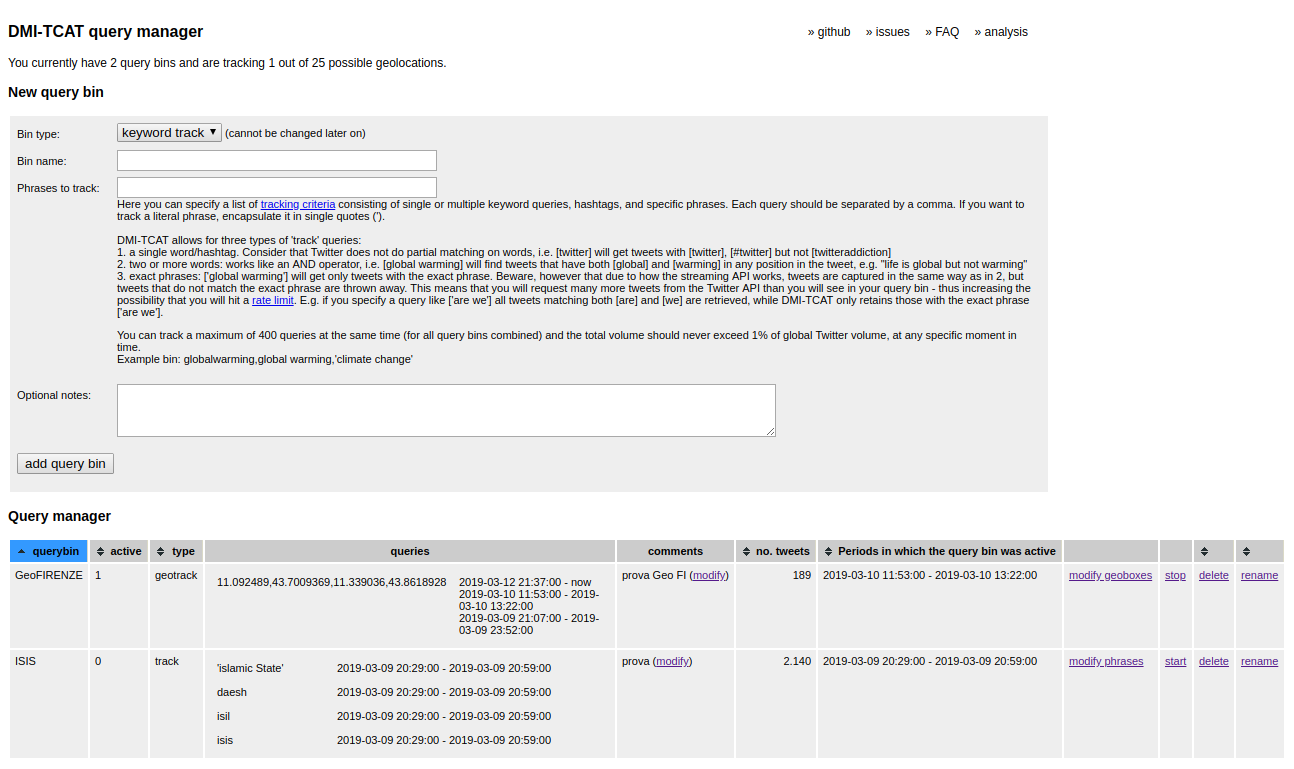
By changing the capture type from “keyword track” to “geo track” the dash legend will change but will always be precise and timely in describing the commands to be entered.
In my case, I carried out some capture tests by running a keyword query called “ISIS” and a georeferencing query by entering GPS data relating to the province of Florence.
ANALYSIS of the working method:
- The keyword query immediately returned many results, as expected, given the very "popular" query. I therefore had to interrupt its execution. Proceeding with In other tests, I entered words in Arabic and the program always mined the tweets.
- The "geo track" provided less data, but, as specified in the legend, the results Twitter will return will not only be those the user decides to share by setting "use my location" but also those Twitter may decide to use by acquiring IP addresses to determine the location. If a user then decides to add a specific location to a Tweet, this will be stored in the acquired data if the location is within the geographic area being investigated.
To view the capture results, simply go to the link http://10.0.2.15/analysis/ or click on the “Analysis” option in the top right corner of the “DMI-TCAT query manager” form:
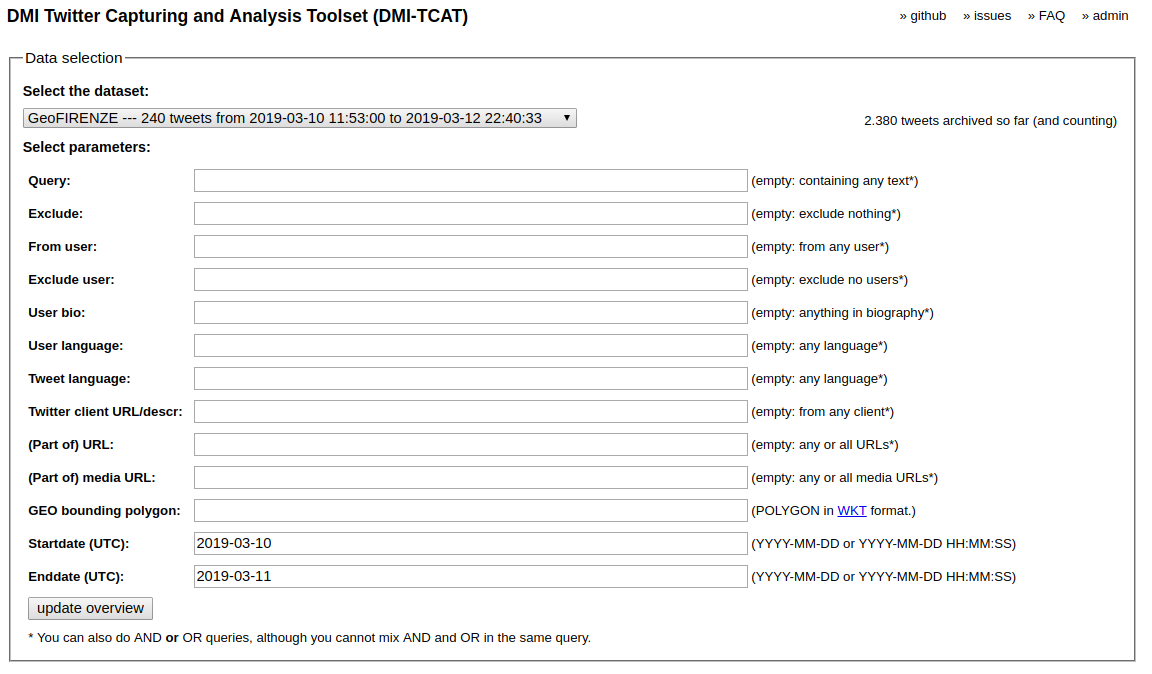
As you can see, the data can be further filtered by applying other parameters defined by the analyst.
From the extracted data, the tool allows you to perform 3 main operations:
- a statistical analysis that includes numerous options;
- operations on users, tweets and hashtags;
- extraction of data of interest in formats that can be read by software for analyzing and visualizing social networks, such as Gephi;
- a part of experimental analysis.
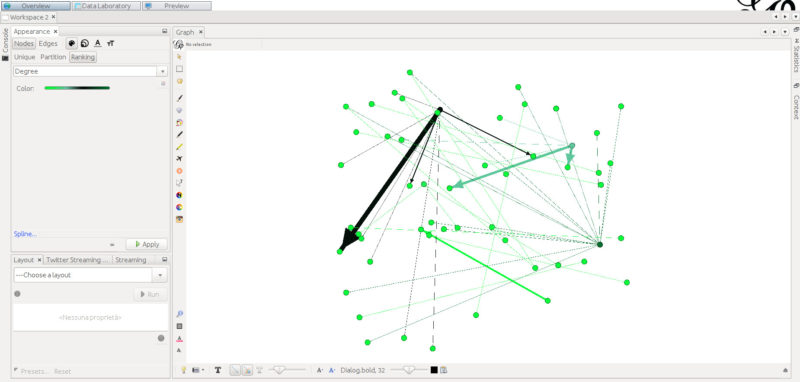
Downloading the dataset of interest is done in well-organized .csv or .tsv files. Exporting and importing into Gephi is also very efficient, as can be seen in the screenshot following, but this could be the subject of a future article…
I hope I haven't bored you, as I was so busy experimenting... Before you know it, it was late at night again, still immersed in the fascinating world of OSINT.
****Editor's note: at the moment I don't know if it's possible to change the "capture mode" once the installation is complete ******
Leave a Reply