


Over the last two months, we have been working on a script that would allow us to have a virtual machine dedicated to Osint in a few minutes, reducing our intervention to a minimum. We called it Argos and is available here.
This is not yet another Kali clone.
Both Kali Linux and Giovanni‘s Tsurugi Linux are far superior and complete products than the Argos Workstation. for my daily use and provided training, I need a far simple environment.
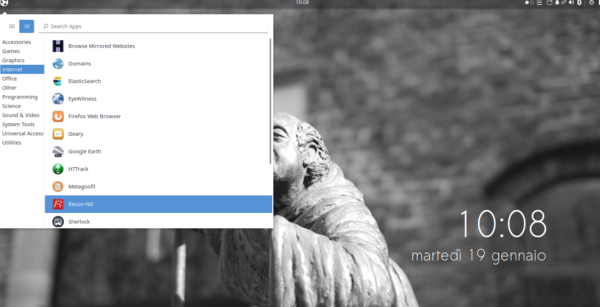
Argos features scripts and report templates related to the needs of a more “traditional” Osint Analyst who needs to use fewer and selected tools.
Setup
There are two important conditions for the script to complete the installation process correctly:
– the VM must be set to the English language,
– the username must be “osint“.
The installation of the script, which is very simple and quick, is described in the “INSTALLING & RUNNING” section.
Alternatively, you can copy and paste this single string into a terminal window:
sudo apt install -y git && git clone https://github.com/SOsintOps/Argos ~/Downloads/Argos && sudo chmod +x ~/Downloads/Argos/setup.sh && ~/Downloads/Argos/setup.sh
This string will install git, download the entire git project and run the setup.sh file.
The featured tools
OSInt
- Amass
- twint
- instaloader
- InstaLooter
- HTTrack
- MediaInfo
- ExifTool
- EyeWitness
- sublist3r
- Photon
- The Harvester
- Metagoofil
- recon-ng
- sherlock
- spiderfoot
- Elasticsearch-Crawler
- Ripgrep
- holehe
- kali-anonstealth
- Moriarty-Project V2.6
- maigret
- Maltego
- and more!
Other softwares
- VLC
- Google Earth
- wget
- cherrytree
- Atom
- KeepassXC
- Kazam
- Audacity
- Ripgrep
- Tor Browser
- OpenShot
- Threat Intelligence Resources
- and more!
Report Templates
We included as many OSInt report templates as possible. Right now, in compliance with the licence, those created by Michael Bazzell are available in the Template directory.
The Template directory
in the Documents directory, We have also included the template created by Pasquale Stirparo for the Analysis of Competing Hypotheses (ACH) analyses. For more information on this analysis methodology, you may want to take a look at these two articles: 1 and 2.

ACH Matrix
Conclusion
we tested Argos on Ubuntu 20.10 and Ubuntu Budgie 20.10 VM, we found some minor imperfections but no major problems.
Please Remember that this script is only the first release towards of our custom Osint VM. I may be not perfect yet, but it gest things done!
Let us know what you think and what tools you would like to see included. you may reach us in the post’s comments or in our Telegram group.
Leave a Reply